
Home › 00_Pro Forum › ConDoc 5 › ConDoc Plan Generator – Renaming Levels in ‘Finished Floor Heights’
- This topic has 3 replies, 2 voices, and was last updated 6 years, 2 months ago by
 Mike Brightman.
-
AuthorPosts
-
July 14, 2020 at 12:31 pm #26899
 Alex BellParticipant
Hi ConDoc Pros,
Myself and a colleague are setting up our own ConDoc template for our team to use.
We are based in the UK, where the ground floor is always level 0, however ConDoc has Level 1 listed as default (screen grab attached for reference).
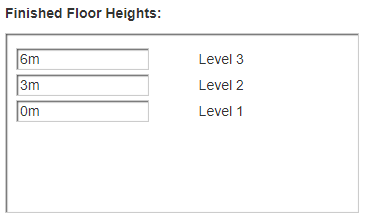
Please can you help me to change the level names so our team do not run into errors further down the line?
Best regards,
Alex
July 14, 2020 at 4:52 pm #26900 Mike BrightmanKeymaster
Hello Alex! You could add a basement, then set the floor heights to match your project. This way the LEVEL layers will start with LEVEL 00. You might have to do some manual layer management if you are running the site plan with ground level plan… I can’t think of any other “gotchas”. Should be good! Avoid changing layer/tag/scene names after you get started with ConDoc. Let me know if that helps.
July 14, 2020 at 5:42 pm #26901Alex BellParticipantHi Mike,
Thanks for your swift reply.
Unfortunately, many of our projects also include basement levels. If it’s not possible to rename the levels for our template this might be the nail in the coffin for us working with ConDoc Tools in the UK.
Do you have any other suggestions or plans to include provision for the UK naming convention?
I look forward to receiving your reply,
Alex
July 14, 2020 at 6:00 pm #26902Mike BrightmanKeymasterWhat do you call basement levels?
I have come across this on a project with mezzanine levels… Like Level 2, then Level 2m, then level 3… So it messes up the count. In the end, the ConDoc levels are perfectly sequential marching up the building. Once you drag and drop in LayOut, you can name those drawings to keep them straight.
In SketchUp, you can rename the LEVEL layers without hurting anything… but leave the LEVEL_ prefix intact. The “LEVEL” button on the ConDoc System probably won’t work perfectly depending on what you call them.
Don’t mess with the scene names until after you are done with the ConDoc Export, but feel free to add to the description. That could help you keep things organized. Once you have exported everything and built your set in LayOut, you can mess with all of the scene names without hurting anything.
-
AuthorPosts
- You must be logged in to reply to this topic.