
Home › 00_Pro Forum › ConDoc 5 › Viewport problem
- This topic has 6 replies, 2 voices, and was last updated 7 years, 3 months ago by
Don Romans.

-
AuthorPosts
-
December 3, 2018 at 10:35 pm #19548
Don Romans
Participant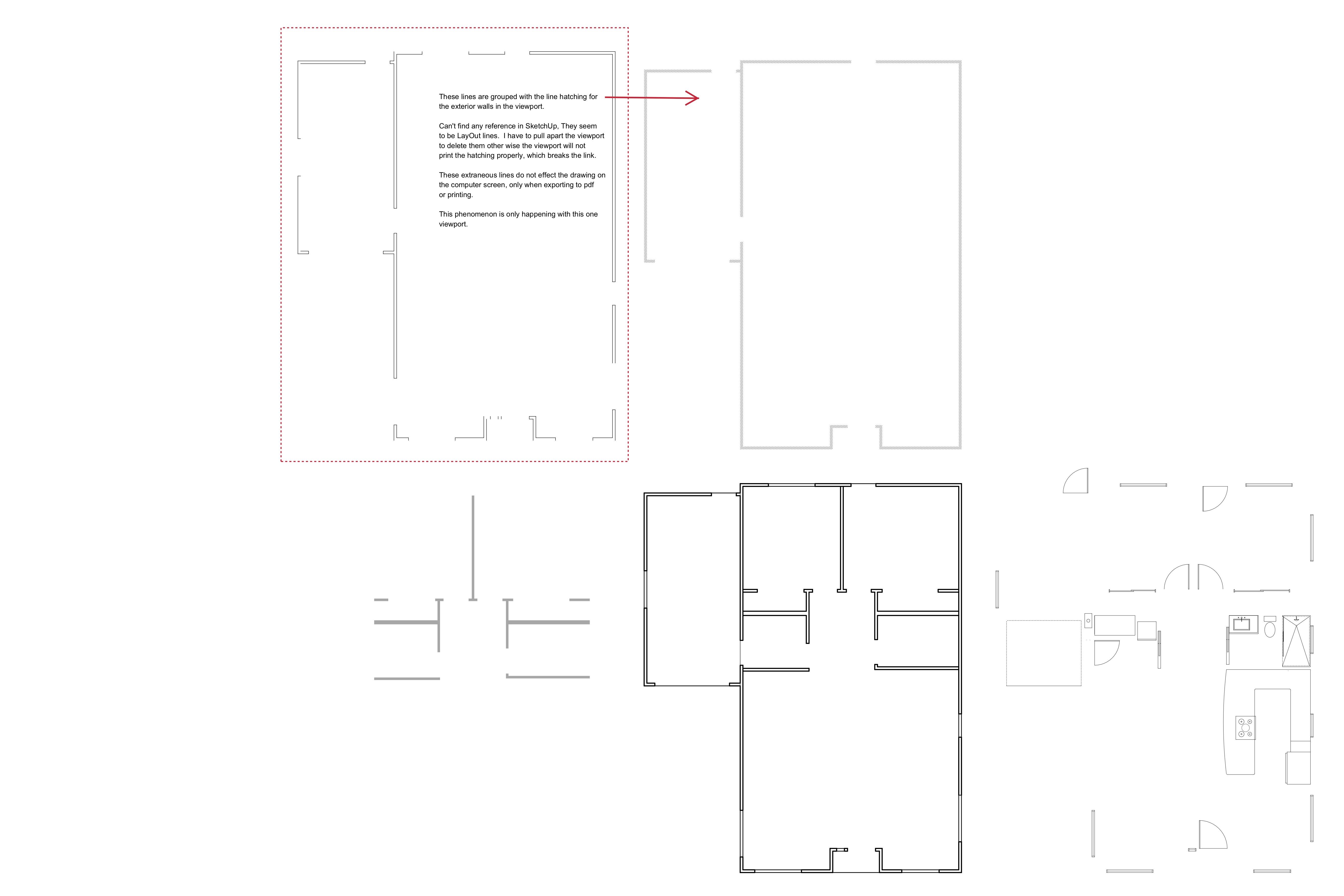
-
This topic was modified 7 years, 4 months ago by
December 3, 2018 at 10:41 pm #19550ParticipantThese lines are grouped with the line hatching for the exterior walls in the viewport. Can’t find any reference in SketchUp, They seem to be LayOut lines. I have to pull apart the viewport to delete them other wise the viewport will not print the hatching properly, which breaks the link. These extraneous lines do not effect the drawing on the computer screen, only when exporting to pdf or printing. This phenomenon is only happening with this one viewport.
^^ This is the text in the above picture. Thanks!
-
This reply was modified 7 years, 4 months ago by
December 6, 2018 at 5:39 pm #19663 Mike BrightmanKeymaster
Hello Don,
I’ve had something similar to this happen before where I swore that LayOut was creating lines that weren’t in my original SketchUp scenes.
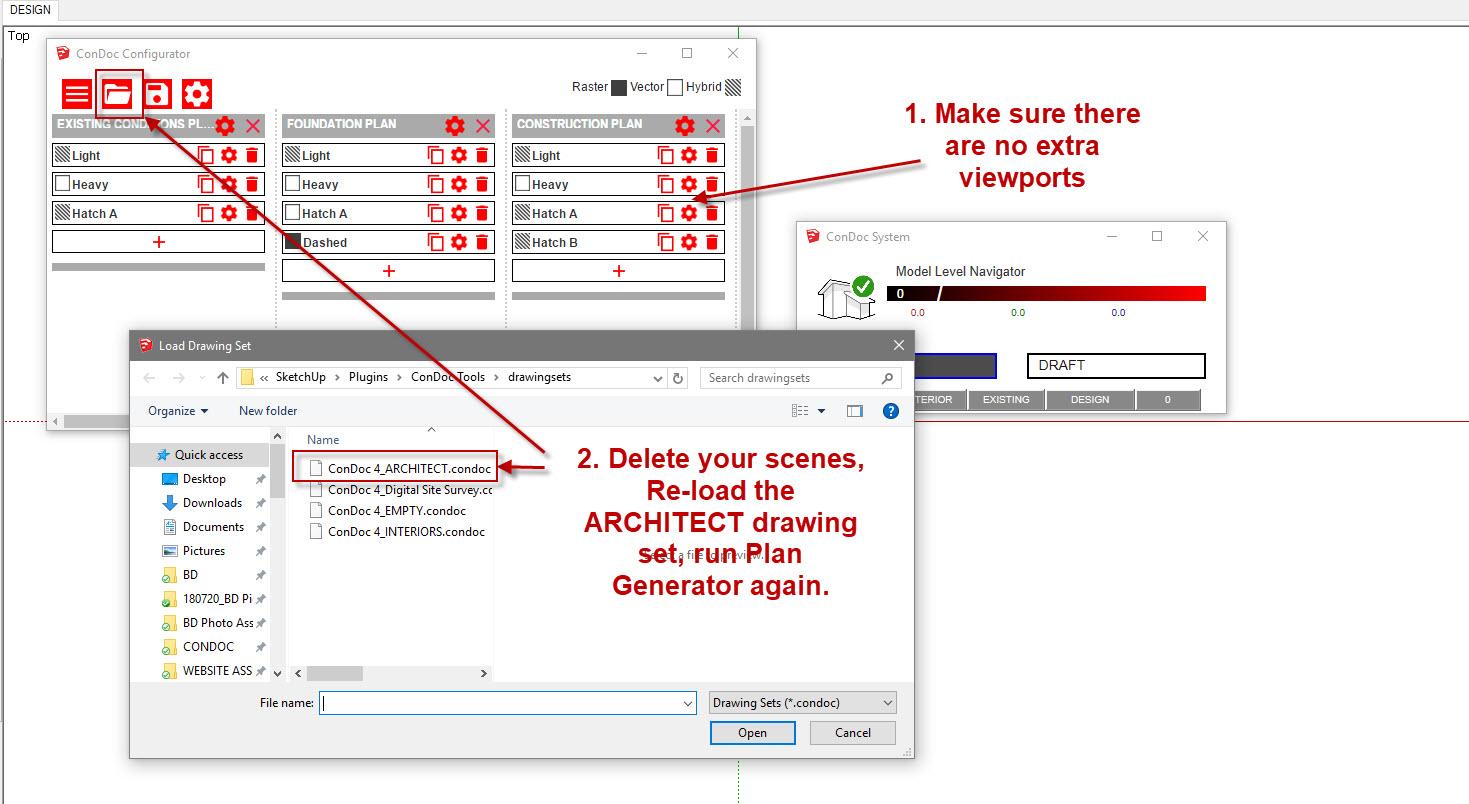
After closer investigation and inspection, the best way to say it is that LayOut does not add any additional viewports to your model. I would double-check your scenes in SketchUp. Is it possible you’ve got an extra viewport somewhere?
You can try deleting and re-running the scenes, or go back and re-load the ConDoc v4 – ARCHITECT.condoc file, and run the scenes again. This usually did the trick for me.
 December 6, 2018 at 8:49 pm #19669Participant
Thanks for the reply, I’ll work on it.
December 7, 2018 at 1:17 am #19677ParticipantWell, after a lot of digging around it seems to be the CONDOC 24 x 36 paper template (iMac – High Sierra). Really strange. I uninstalled (and trashed all traces of) CONDOC, SketchUp, and LayOut and did a fresh install of them. Same thing happened, until I used a different paper template.
December 9, 2018 at 5:43 pm #19696Mike BrightmanKeymasterHello Don,
That’s very strange, but thank you for bringing that to our attention. We’ll make a note of it and see if we can see why that’s happening.
Does the issue still occur if you manually create a 24×36 drawing on your own?
December 9, 2018 at 10:52 pm #19704ParticipantLuke,
It does not occur when using a blank 24×36 drawing. Still has the lines but they don’t affect the pdf creation or the printing of the document. Just by chance I tried a blank page, did it several times both with the ConDoc and the blank page, same result. Maybe a Mac thing.
-
This topic was modified 7 years, 4 months ago by
-
AuthorPosts

- You must be logged in to reply to this topic.