
Home › 00_Pro Forum › ConDoc 5 › more problems
- This topic has 3 replies, 3 voices, and was last updated 3 days, 4 hours ago by
 Mike Brightman.
-
AuthorPosts
-
January 19, 2026 at 1:29 am #35497
[email protected]
Participant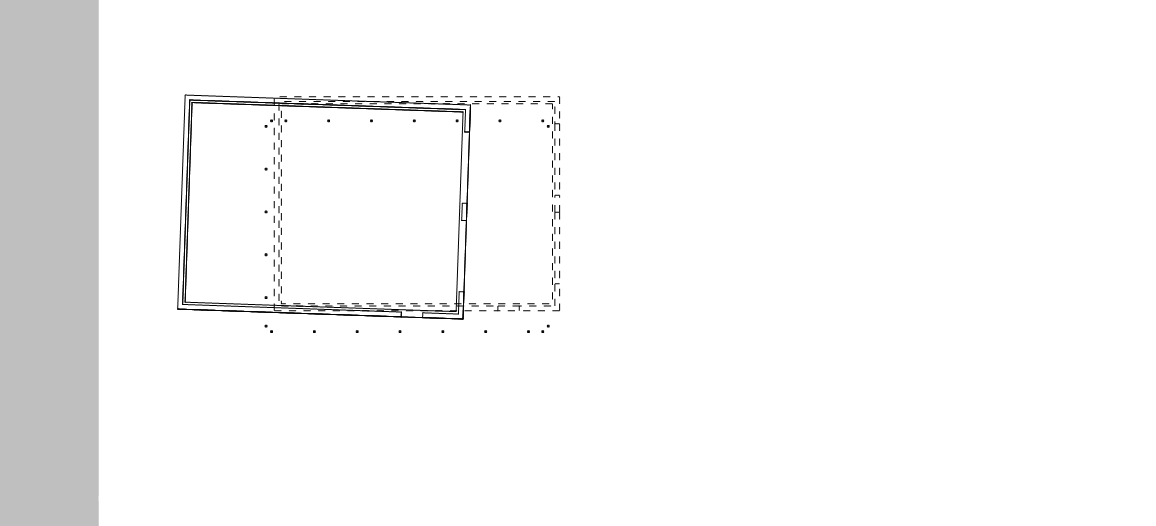
Just sent my design over to layout and this is what I get? I don’t understand, surely this stuff should be fixed, after all I’m paying $40/month for this software. We should probably work on getting the software organized and or someone needs to be showing a more detailed tutorial on how all this works. Scene tags, trouble shooting different things etc. Everytime I create a new drawing im constantly having to change things in scenes so everything shows up correctly. You make it look so easy in your youtube video but that is not the case at all when freshly installing and using this software.
January 19, 2026 at 1:53 am #35498 Mike BrightmanKeymaster
Hello Spencer,
Looks like you either have your scene cameras out of whack or you rotated one of the stacked viewports. Try using the new Drawing Camera Update button to get your scenes back in alignment. If you rotated a stacked viewport it can be fixed, but you might just export again. I’m in the office all day tomorrow, give me a shout and we can sort it out! 720 443 3242.
Mike
April 1, 2026 at 6:06 pm #35542[email protected]
ParticipantI am also having issues with my scarpbook and pasting to layout. when i size the viewport to my page it changes visibilty of items in the model. In this instance it is removing my outdoor grille from everything. It also changes the style from color to black and white when i export it to pdf
.Anyone got any ideas on how to remedy this.
April 1, 2026 at 6:51 pm #35543Mike BrightmanKeymasterThis usually happens when the SketchUp model linked to LayOut has not been updated.
A common chain of events is:
You export drawings from ConDoc into the ConDoc Drawing Scrapbook, start building your LayOut file, then go back into SketchUp and keep working. You might add tags, make new scenes, or create new drawings. When you export again, the scrapbook updates with the new drawings, but the SketchUp model reference inside your LayOut presentation is still pointing to the older version of the model.
So when you drag drawings from the scrapbook into LayOut, the viewports do not always know what scene to use (typically because the scenes needed don’t exist in the old model). LayOut may fall back to the last saved scene or another default view, which makes it look like everything is broken.
The fix is simple:
Before dragging drawings from the ConDoc Drawing Scrapbook, go to Window > Document Setup > References and update your linked SKP file.
My favorite way to avoid this completely is to open your SketchUp model directly from LayOut. In References, select the SKP and click Edit. That opens the linked model in SketchUp and creates a live connection. From that point on, every time you save in SketchUp, LayOut updates automatically.
If you want, give me a call at 720-443-3242 and I can help you get it sorted out quickly.
-
AuthorPosts


- You must be logged in to reply to this topic.