Home › 00_Pro Forum › ConDoc 5 › ConDoc 5.1 Available Now! › Reply To: ConDoc 5.1 Available Now!
 Mike Brightman
Thanks JYD! I have to agree the ConDoc tags are a major leap forward! and… we are just a few days (it’s done!) away from a ConDoc 5.2 release… with “Express Tools” and a few other helpful tweaks!
You have the right idea, and the ConDoc Tags are actually really flexible. I would recommend grouping the entire assembly, and applying the LEVEL, ELEMENT, LOCATION, and CONDITION to the outside. Double-click in, then assign 2d Graphic and 3d Object to the corresponding groups. This allows you to move the door around as one piece. This is how I treat most ELEMENTS.
But for ELEMENTS like walls, roofs, floors… You could either make one big group and tag them once… or keep them all on your own and tag each. The system is flexible, your call!
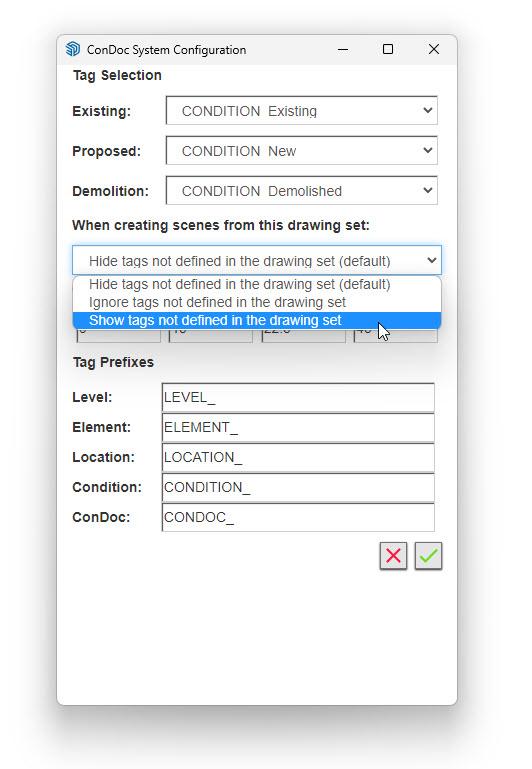
As you noticed, you can also use SketchUp tags parallel with ConDoc Tags. Or, you can use them as two separate systems. You can use either SketchUp tags or ConDoc tags for the 2d Graphic since they are the “last in line”. I suppose it would be best practice to start by using only ConDoc Tags. Then once you get the hang of tagging, you could mix in some SketchUp tags for line types within the 2d Graphic group. Or, switch on “show tags” within the Configurator settings to force on all SketchUp tags not included in the drawing set, then chip away at their visibility with ConDoc tags. Advanced technique for sure, but super useful with plugins that create unpredictable tags/layers.
Let me know if that helps!
Mike